

Genie+ is Lightning Lane Now
Disney World renamed Genie+ to Lightning Lane Multi Pass. While the name change tripped people up, the mechanics are the same. You pay a daily fee to book return windows for rides and skip the long standby lines. It is a rebranding, not a total system rebuild.
To understand where we are now, it helps to look back. Disney first introduced FastPass back in 1999, a complimentary service allowing guests to reserve ride times. It was hugely popular, but also created its own challenges with availability. FastPass then evolved into FastPass+, incorporating a 60-day booking window for resort guests. Then came Disney Genie in 2021, a free planning tool within the My Disney Experience app, with Genie+ as a paid add-on for Lightning Lane access.
Genie+ was initially presented as a personalized itinerary planner, but quickly became known as the key to shorter wait times. Now, Disney has streamlined the branding, dropping the "Genie+’ name and simply referring to the paid service as Lightning Lane. This means when you purchase access, you are directly buying access to the Lightning Lane queues. The old FastPass lanes are gone, replaced by this system. It"s a simplification of the language, though the underlying mechanics are largely unchanged.
The shift to calling it Lightning Lane aims to reduce confusion, though many guests still find the system complex. It’s essential to remember that Lightning Lane access isn’t guaranteed; it's subject to availability, and popular rides can "sell out" quickly. Understanding this fundamental aspect is crucial for effective Disney trip planning.
How to pick your rides
Securing Lightning Lane access all happens within the My Disney Experience app. Once you’ve purchased Genie+, you can begin making selections starting at 7:00 AM on the day of your visit. The app displays available attractions and their current return times. You choose a ride and a time slot, and that reservation is added to your itinerary. It's a bit like booking a FastPass, but with a more dynamic pricing and availability model.
There are two distinct types of Lightning Lane selections: those included with Genie+, and Individual Lightning Lane selections. The Genie+ Lightning Lane access covers a selection of rides at each park and operates on a rolling basis – you can book another selection as soon as you’ve used your current one, or two hours have passed since booking.
Individual Lightning Lane selections are for the most popular rides – think Seven Dwarfs Mine Train at Magic Kingdom or Avatar Flight of Passage at Animal Kingdom. These are not included with Genie+ and require a separate, per-ride purchase. Pricing for Individual Lightning Lane varies depending on the ride, the date, and the expected demand, generally ranging from $10-$25 per person, per ride.
Ride availability is a key factor. Popular attractions will sell out, especially during peak season. It's not uncommon for the most sought-after rides to have no Lightning Lane availability by mid-morning. Park hopping adds another layer of complexity. You can only make Genie+ selections for the park you're currently in until you’ve entered another park. After 2:00 PM, you can make selections for any park, regardless of your location.
- Open the My Disney Experience app.
- Purchase Genie+ (if you haven’t already).
- At 7:00 AM, select your first Lightning Lane attraction.
- Book your next ride after you scan into your current one or once two hours have passed.
- For Individual Lightning Lane rides, purchase access separately as needed.
Park-by-park priorities
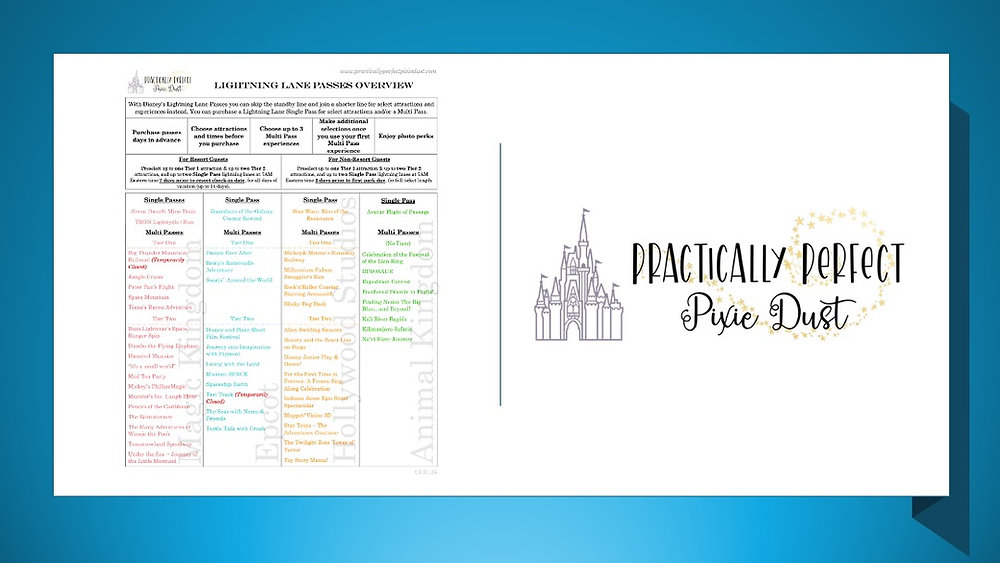
Each Disney World park demands a slightly different Lightning Lane strategy. Magic Kingdom, with its concentration of classic attractions, requires prioritizing the most popular rides like Seven Dwarfs Mine Train, Peter Pan’s Flight, and Space Mountain. These will likely be the first to sell out, so book them early. Don’t underestimate Jungle Cruise; it's consistently popular and can have long standby waits.
EPCOT’s strategy revolves around Test Track, Frozen Ever After, and Remy's Ratatouille Adventure. Guardians of the Galaxy: Cosmic Rewind is an Individual Lightning Lane selection and consistently commands a high price. World Showcase attractions generally have shorter wait times, so you can often skip the Lightning Lane there.
Hollywood Studios is heavily focused on Star Wars: Rise of the Resistance (Individual Lightning Lane) and Slinky Dog Dash. Tower of Terror and Millennium Falcon: Smugglers Run also benefit from Lightning Lane access. Be prepared to book these early, as they are consistently in high demand.
Animal Kingdom’s priority should be Avatar Flight of Passage (Individual Lightning Lane) and Na’vi River Journey. Kilimanjaro Safaris and Expedition Everest are also good choices for Lightning Lane reservations. The park tends to be less crowded than others, so standby waits are sometimes manageable, but these rides are consistently popular.
- Magic Kingdom: Prioritize Seven Dwarfs Mine Train, Peter Pan’s Flight, Space Mountain.
- EPCOT: Focus on Test Track, Frozen Ever After, Remy's Ratatouille Adventure.
- Hollywood Studios: Target Slinky Dog Dash, Tower of Terror, Millennium Falcon: Smugglers Run.
- Animal Kingdom: Book Avatar Flight of Passage, Na’vi River Journey, Kilimanjaro Safaris.
Lightning Lane Priority Rides - 2026 Guide
| Ride Name | Typical Wait Time (Standby) | Recommended Lightning Lane Priority | Notes |
|---|---|---|---|
| Seven Dwarfs Mine Train (Magic Kingdom) | 60-90 minutes | High | Lightning Lane often sells out quickly, particularly in the morning. |
| Space Mountain (Magic Kingdom) | 45-75 minutes | High | Popular ride with consistently long wait times. |
| Slinky Dog Dash (Hollywood Studios) | 60-90 minutes | High | One of the most in-demand rides; book early. |
| Twilight Zone Tower of Terror (Hollywood Studios) | 45-75 minutes | Medium | Wait times fluctuate, but generally high throughout the day. |
| Remy's Ratatouille Adventure (EPCOT) | 45-75 minutes | High | Very popular, especially with families. |
| Test Track (EPCOT) | 30-60 minutes | Medium | Single Rider line available, but Lightning Lane is still recommended. |
| Avatar Flight of Passage (Animal Kingdom) | 60-90+ minutes | High | Consistently the longest wait time in Animal Kingdom; prioritize this. |
| Kilimanjaro Safaris (Animal Kingdom) | 30-60 minutes | Medium | Wait times can vary significantly based on time of day. |
Illustrative comparison based on the article research brief. Verify current pricing, limits, and product details in the official docs before relying on it.
Stacking Lightning Lanes: Maximizing Your Day
’Stacking’ Lightning Lanes is the art of booking multiple return times throughout the day, minimizing your overall wait time. The key is understanding the 120-minute rule. You can book another Genie+ Lightning Lane reservation either after you’ve used your current one or 120 minutes after making your previous selection, whichever comes first. This allows you to essentially chain reservations together.
The app makes stacking relatively straightforward. After booking a Lightning Lane, keep checking for new availability. As soon as the 120-minute timer expires, you can book another selection. It takes practice to get the hang of it, but mastering this technique can significantly reduce your time in line. Be ready to refresh the app frequently.
What happens if a ride is delayed or canceled? Disney typically adjusts your Lightning Lane reservation to reflect the downtime. You may receive a new return time, or in some cases, a multiple-experience pass allowing you to book a Lightning Lane for a different attraction. The system isn't perfect, and occasional glitches do occur, so it's good to be prepared to adjust your plans.
The AI aspect of Genie+ comes into play by learning from your selections and suggesting rides you might enjoy. While not always accurate, it can sometimes uncover hidden gems or recommend less crowded attractions. Don’t rely on it completely, but it’s worth exploring the suggestions.
- Book your first Lightning Lane at 7:00 AM.
- After redeeming that pass, or 120 minutes after booking, book another.
- Repeat this process throughout the day.
- Monitor for ride closures and adjust plans accordingly.
Multi pass vs. single pass
The distinction between Genie+ Lightning Lane and Individual Lightning Lane is critical. Genie+ provides access to a range of rides, offering a bundled experience for a single daily price. Individual Lightning Lane, on the other hand, is a separate purchase for the most in-demand attractions. Think of it as a premium add-on for the absolute must-do rides.
Pricing for Individual Lightning Lane varies dramatically, depending on the ride, the park, and the day. Star Wars: Rise of the Resistance and Avatar Flight of Passage consistently command the highest prices, often exceeding $20 per person. Prices can fluctuate throughout the day based on demand, so it’s wise to check frequently.
Is paying extra for Individual Lightning Lane worth it? It depends. If a particular ride is a non-negotiable part of your Disney experience, and you’re unwilling to wait in a potentially hours-long standby line, then the cost may be justified. However, if you’re flexible and willing to prioritize other attractions, you might be able to skip it.
Consider your overall budget and the number of people in your party. The cost of Individual Lightning Lane can quickly add up. If you're traveling with a large family, the extra expense might be significant.
2026 Predictions & Potential Changes
Predicting the future of Genie+ is tricky, but based on Disney’s past behavior and current trends, we can speculate. One likely change is continued price increases. Disney has already raised Genie+ prices several times, and further increases seem inevitable, especially as demand remains high. We might see dynamic pricing become even more granular, adjusting based on real-time conditions.
Disney will likely use more data to suggest rides based on what you've already ridden. They have to keep the interface simple, though, or people will stop using the app entirely. This seems like the most logical path for the software to take.
Disney might also experiment with different tiers of Genie+ access, offering premium options with additional benefits, such as earlier booking windows or access to exclusive experiences. This could create a more segmented system, catering to different budgets and preferences. It's a risk, as it could alienate some guests, but it's a strategy they've used successfully in other areas.
The algorithm powering Genie+ will likely become more sophisticated, learning from guest behavior and adjusting ride availability accordingly. The goal is to optimize the system for both Disney and its guests, reducing wait times and maximizing guest satisfaction. It's a constant work in progress, and we can expect to see ongoing refinements.
What's your biggest frustration with the current Genie+ system?
Vote below!
Troubleshooting Common Genie+ Issues
The My Disney Experience app isn’t always flawless. One common issue is app crashes. If this happens, try closing and reopening the app. If the problem persists, try restarting your phone. It's a good idea to have a backup plan in case the app becomes unresponsive.
Sometimes, your Lightning Lane reservation might disappear. This can happen due to technical glitches or network connectivity issues. If this occurs, check your itinerary within the app. If the reservation is still missing, head to Guest Services for assistance. Be prepared to provide your reservation details.
Difficulty finding availability for desired rides is another frequent complaint. If you’re unable to secure a Lightning Lane reservation, keep refreshing the app. Availability can change rapidly as other guests make and cancel reservations. Consider joining the standby line as a backup option.
For further assistance, Disney’s official support website provides a wealth of information and troubleshooting tips: You can also contact Disney’s Guest Services directly for personalized support.

No comments yet. Be the first to share your thoughts!